前端路由机制详解 🚀
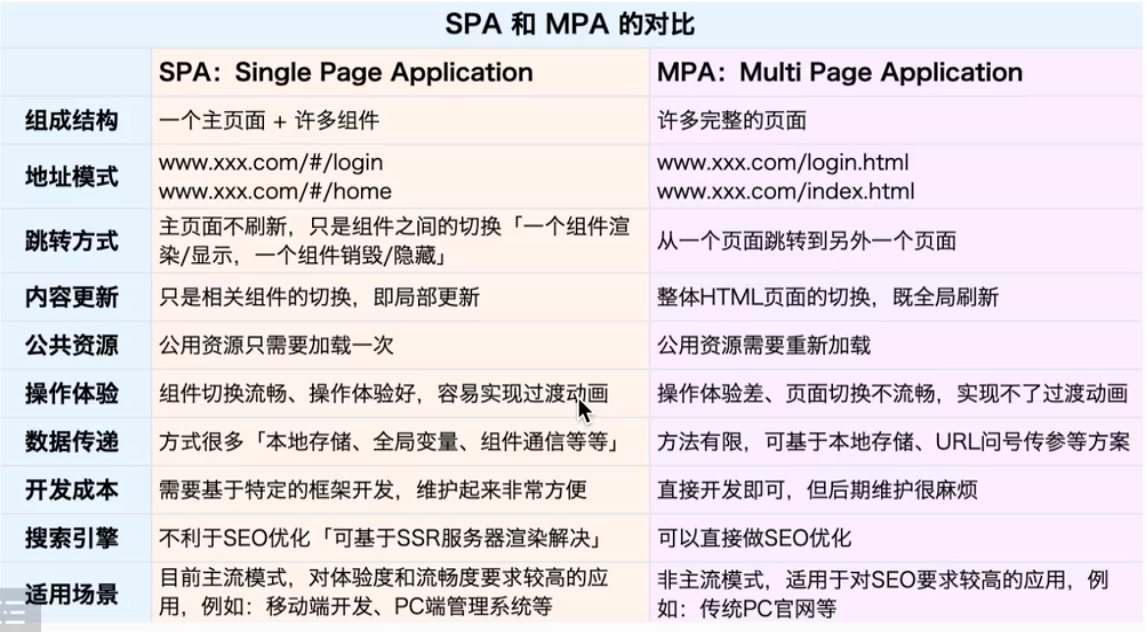
1. SPA vs MPA 对比 🔄
1.1 SPA (单页应用)
- 只有一个主页面
- 页面切换不刷新
- 前端路由实现页面切换
- 优点:用户体验好,切换快速
- 缺点:首屏加载较慢,SEO相对较差
1.2 MPA (多页应用)
- 多个独立页面
- 页面切换需要刷新
- 服务器路由控制切换
- 优点:首屏加载快,SEO友好
- 缺点:页面切换体验较差
2. 前端路由实现方式 🛠️
2.1 Hash路由 (#)
Hash路由是前端路由最简单的实现方式,通过监听URL中hash值的变化来实现路由切换。
核心特点:
- 不会触发页面刷新
- 兼容性好
- URL中带有#号
- 可以通过
window.onhashchange监听路由变化
实现示例:
html
<nav class="nav-box">
    <a href="#/">首页</a>
    <a href="#/product">产品</a>
    <a href="#/personal">个人中心</a>
</nav>
<div class="view-box"></div>

<script>
const viewBox = document.querySelector('.view-box');
// 路由配置表
const routes = [
    { path: '/', component: '首页内容' },
    { path: '/product', component: '产品内容' },
    { path: '/personal', component: '个人中心内容' }
];

// 路由匹配函数
const routerMatch = () => {
    const hash = location.hash.substring(1);
    const route = routes.find(item => item.path === hash);
    viewBox.innerHTML = route ? route.component : '404';
};

// 初始化
location.hash = '/';
routerMatch();

// 监听hash变化
window.onhashchange = routerMatch;
</script>
2.2 History路由 🔄
History路由利用HTML5的History API实现,提供了更优雅的URL格式。
核心特点:
- 无#号的干净URL
- 需要服务器配置支持
- 提供更强大的状态管理
- 可以通过
popstate事件监听路由变化
实现示例:
html
<nav class="nav-box">
    <a href="/">首页</a>
    <a href="/product">产品</a>
    <a href="/personal">个人中心</a>
</nav>
<div class="view-box"></div>

<script>
const viewBox = document.querySelector('.view-box');
const navBox = document.querySelector('.nav-box');

// 路由配置
const routes = [
    { path: '/', component: '首页内容' },
    { path: '/product', component: '产品内容' },
    { path: '/personal', component: '个人中心内容' }
];

// 路由匹配
const routerMatch = () => {
    const path = location.pathname;
    const route = routes.find(item => item.path === path);
    viewBox.innerHTML = route ? route.component : '404';
};

// 拦截导航点击
navBox.onclick = (e) => {
    if (e.target.tagName === 'A') {
        e.preventDefault();
        const href = e.target.getAttribute('href');
        history.pushState({}, '', href);
        routerMatch();
    }
};

// 初始化
history.pushState({}, '', '/');
routerMatch();

// 监听浏览器前进后退
window.onpopstate = routerMatch;
</script>
3. 注意事项 ⚠️
3.1 Hash路由注意点
- hash值变化不会导致页面刷新
- 兼容性好,支持老版本浏览器
- 不太美观,URL中带有#号
- 不利于SEO
3.2 History路由注意点
- 需要服务器配置支持,否则刷新会404
- URL更美观
- 提供更丰富的API(pushState, replaceState等)
- 需要考虑浏览器兼容性
3.3 服务器配置示例
nginx
location / {
    try_files $uri $uri/ /index.html;
}
4. 现代框架中的应用 🎯
- Vue Router:默认支持hash和history两种模式
- React Router:同样支持两种模式
- Angular Router:主要使用history模式
5. 最佳实践建议 💡
- SPA应用推荐使用History模式
- 需要兼容老旧浏览器时使用Hash模式
- 确保正确配置服务器以支持History模式
- 合理使用路由懒加载优化性能
- 注意处理404页面的优雅降级